Comprehensive Integration Assessment
Introduction
Welcome to your essential guide for evaluating your integration with Two's B2B payment solutions. This document provides a structured approach to help you meticulously assess your setup, ensuring it's robust, reliable, and offers a seamless purchasing experience for your business customers.
A thorough assessment is paramount for a successful launch and sustained operational excellence. By systematically working through the checkpoints below, you can proactively identify potential issues, confirm critical functionalities, and ensure your integration aligns with Two's best practices.
This guide offers a comprehensive set of general checkpoints. Depending on the specific Two API endpoints and features you've implemented (e.g., Order API, Trade Account API, Billing Accounts), there may be additional considerations unique to your integration. Always consult the relevant API documentation for detailed specifications and advanced scenarios.
Core Principles for a Successful Integration
Before diving into specific feature checks, keep these overarching principles in mind:
- User Experience (UX): Prioritise a clear, intuitive, and frictionless journey for your B2B buyers at every touchpoint.
- Robust Error Handling: Implement comprehensive error handling that provides clear, actionable feedback to users and logs detailed information for efficient troubleshooting by your development team.
- Data Accuracy & Consistency: Ensure all data exchanged with Two (e.g., order details, company information, amounts, addresses) is precise, correctly formatted, and consistent across systems.
- Security Best Practices: Adhere to all security best practices for API integrations, diligently protecting sensitive data and API credentials.
- Thorough Testing: Test all user flows and system interactions exhaustively, including successful paths ("happy paths"), edge cases, and potential failure points.
Integrating the Two Order API
This section focuses on the core lifecycle of an order when processed through Two's Checkout API. A well-tested Order API integration is fundamental to processing B2B transactions with Two.
1. Presenting Two as a Payment Option
Conditional Display Logic
- Is Two correctly presented as a payment option exclusively to eligible B2B buyers?
- Consider if this involves checks after successful company identification (e.g., via Company API or your own KYB solution) or credit approval (e.g., after an Order Intent check).
Clarity of Payment Terms
- Does the checkout clearly communicate any relevant payment terms (e.g., "Pay by Invoice," "Net 30 Days") associated with choosing Two?
- Are these terms dynamically and accurately displayed based on the buyer or order context, if applicable?
Visual Presentation
- Is the Two payment option clearly identifiable and visually consistent with your checkout design?
2. Order Creation & Buyer Verification
Successful Order Placement
- Can orders be successfully created with all required fields (e.g.,
buyer_company,line_items,gross_amount,currency,merchant_urls) viaPOST /v1/order? - Verify the accuracy and correct formatting of all data sent, including
shipping_address,billing_address,buyer.representative, and anymetadata. - Test with various valid and potentially problematic data inputs (e.g., special characters, different address formats).
Buyer Verification Flow (Two Hosted Page)
- Are buyers correctly redirected to Two's
payment_urlfor verification when the order status isAPPROVEDand state isUNVERIFIED? - Does the verification process on Two's hosted page handle both successful and unsuccessful outcomes gracefully?
- Are buyers correctly redirected back to your specified
merchant_urls.confirmation_urlupon successful verification? - Are buyers correctly redirected back to your specified
merchant_urls.cancel_urlif they cancel? - Is the
merchant_urls.error_urlcorrectly utilised for unrecoverable errors during the Two-hosted verification?
Handling API Responses
- Does your system correctly interpret and act upon all relevant HTTP status codes and response bodies from the Order API?
- Are validation error messages (e.g., for missing or malformed fields) handled appropriately, potentially with user-friendly feedback?
- Is the
id(Two's order ID) from the response correctly stored in your system?
3. Order Confirmation
Internal Order State Update
- Is your internal order status correctly updated (e.g., to
CONFIRMED,AWAITING_FULFILMENT) after successful order placement and buyer verification with Two? - Note: Two's order
STATEbecomesVERIFIEDafter buyer verification, and you can then callPOST /v1/order/:order_id/confirmto move it toCONFIRMED.
Buyer Communication
- Does the buyer receive an appropriate and timely order confirmation from your system (e.g., email, on-screen message) detailing the successful order and next steps?
- Ensure this confirmation aligns with the information processed by Two.
4. Order Fulfilment
Triggering Invoicing
- When an order is marked as fulfilled in your system, is the fulfilment correctly communicated to Two using the
POST /v1/order/:order_id/fulfillmentsendpoint? - Is the invoicing process by Two initiated correctly upon successful fulfilment?
Fulfilment Data Accuracy
- Are all necessary and accurate fulfilment details (e.g.,
fulfilled_line_items,tracking_info,terms.duration_daysif applicable) sent to Two? - Test partial vs. full fulfilments if your business logic supports them.
Fulfilment Confirmation
- Does your system correctly handle the response from the
fulfillmentsendpoint? - Is the order
STATEin Two correctly updated toFULFILLED?
5. Order Modifications & Cancellations
Order Editing (Before Fulfilment)
- If your integration supports order edits (e.g., changing quantities, items, amounts) before fulfilment, are these changes correctly communicated and reflected in Two using the
PUT /v1/order/:order_idendpoint? - Verify that changes in amounts or line items are accurately updated.
Order Cancellation
- Can orders be successfully cancelled via the
POST /v1/order/:order_id/cancelendpoint before fulfilment? - Is the order
STATEupdated appropriately toCANCELLEDin both your system and Two? - What happens if you attempt to cancel an already fulfilled or invoiced order? (This should typically be disallowed or handled as a refund).
6. Refund Processing
Full Refunds
- Can you successfully process full refunds for orders paid via Two using the
POST /v1/order/:order_id/refundendpoint? - Ensure the
reasonandrefunded_line_items(if applicable) are correctly sent.
Partial Refunds
- Can you successfully process partial refunds (e.g., for specific line items or a custom amount)?
- Verify that the refunded amounts and items are accurate.
Refund Status & Communication
- Is the refund status correctly tracked in your system and reconciled with Two?
- Does Two issue a credit note to the buyer upon successful refund processing?
- Is the order
STATE(or a representation of it) updated toREFUNDEDorPARTIALLY_REFUNDEDas appropriate?
7. Data Accuracy in Orders & Invoices
Amounts & Calculations
- Are gross amounts, net amounts, tax amounts, and any discounts calculated correctly and consistently between your system, the data sent to Two, and the final Two invoice/credit note?
- Verify handling of shipping fees and other charges.
Line Item Details
- Do line item descriptions, SKUs, quantities, unit prices, and total prices match on the order, the data sent to Two, and the subsequent invoice?
Company and Address Information
- Is the buyer's company name, registration number, billing address, and shipping address accurately reflected on Two's invoices?
8. Webhooks (Optional but Recommended)
Webhook Subscription
If using Order Webhooks, have you correctly subscribed to relevant events (e.g., invoice.issued, invoice.credited, payment.received)?
Endpoint Handling
- Can your webhook endpoint reliably receive and process notifications from Two?
- Is signature verification implemented to ensure webhook authenticity?
Data Reconciliation
- Are you using webhook data to keep your internal systems synchronised with Two's order and payment statuses?
Integrating Trade Accounts (Trade Account API)
If you are enabling buyers to create and use trade accounts for a more streamlined B2B purchasing experience, thorough testing of the Trade Account API is crucial.
1. Company Account Creation & Management
Creating a Trade Account
POST /trade-account/v3/customer
- Can you successfully create a new trade account customer with the required fields (
merchant_customer_id,contact_persons)? - Are you providing the company's
canonical_id(recommended) orcountry_code+organization_numberfor company lookup? - Does the API response return the customer data including
companydetails? - How does your system handle scenarios where a company already exists (e.g., 409 Conflict)?
Updating a Trade Account
PUT /trade-account/v3/customer/{cid}
- Can you successfully update existing trade account details (contact persons, invoice addresses)?
- Are you using the
merchant_customer_idor Two's system ID correctly in the path?
2. User Registration & Verification under a Trade Account
Registering a User
POST /trade-account/v3/customer/{cid}/user
- Can individual buyer representatives be successfully registered under an existing trade account with required details (
merchant_user_id,email,first_name,last_name)? - Does the response return
verified: falsefor newly created users?
Generating Verification URL
POST /trade-account/v3/user/{uid}/verification/url
- Can you successfully generate a verification URL by providing the
return_url? - Does the response contain the
redirect_urlto send the user to?
User Verification Flow
- Does redirecting the user to the
redirect_urllead to Two's verification page? - Upon successful user verification, are they correctly redirected to your
return_url? - Can you check a user's verification status using
GET /trade-account/v3/user/{uid}and confirm theverifiedfield istrue?
3. Leveraging Verified Trade Accounts in Orders
Associating Orders with Verified Users
- When creating an order (
POST /v1/order), if you include themerchant_user_idof averified: trueuser, does this lead to a more streamlined checkout experience? - Confirm that the order is correctly associated with the trade account user.
Going Live with a Plugin
Two's e-commerce plugins (e.g., for Shopify, WooCommerce, Magento) are designed for quick setup and are rigorously tested. However, to ensure a smooth transition to live operations, we strongly recommend the following steps:
1. Sandbox Testing (Crucial)
- Obtain Sandbox Keys: First, ensure you have your sandbox API keys from the Two Merchant Portal. Refer to our guide on Getting API Keys if needed.
- Configure Plugin in Sandbox Mode: Set up the Two plugin in your e-commerce platform's staging or development environment using these sandbox keys.
- Place Test Orders: Conduct several test orders covering various scenarios:
- Successful order placement by a new B2B customer
- Successful order placement by an existing/returning B2B customer
- Orders with different product types or values
- Attempted orders that might be declined (if possible to simulate)
- Order fulfilment
- Order cancellation (if supported by the plugin before fulfilment)
- Processing refunds (full and partial)
- Verify Data Flow: Check that order details, customer information, and amounts are correctly captured by the plugin and reflected in your Two Merchant Portal (sandbox view).
- Rule out Conflicts: This testing helps identify any potential conflicts with other plugins or custom themes in your e-commerce setup.
2. Review Plugin Configuration
Double-check all plugin settings to ensure they match your business requirements (e.g., payment method display name, any specific terms or conditions).
3. Contact Two for Production Access
Once you are satisfied with sandbox testing and confident that everything works as expected, get in touch with your Two contact point or our support team at [email protected]. We will assist you in switching your Merchant Portal account to production mode, allowing you to obtain your live API keys.
4. Switch to Production Keys
Replace the sandbox API keys in your plugin configuration with your new production API keys.
Automated Integration Assessment Tool
Two provides an automated tool within the Merchant Portal designed to help you track your integration progress against common milestones.
- Access the Portal: Navigate to the Integration Progress tab in the Two Merchant Portal and log in with your merchant credentials.
- Review Checklist: The portal presents a checklist of key integration points. As you implement and test these features in your integration, you can see your progress visually reflected.
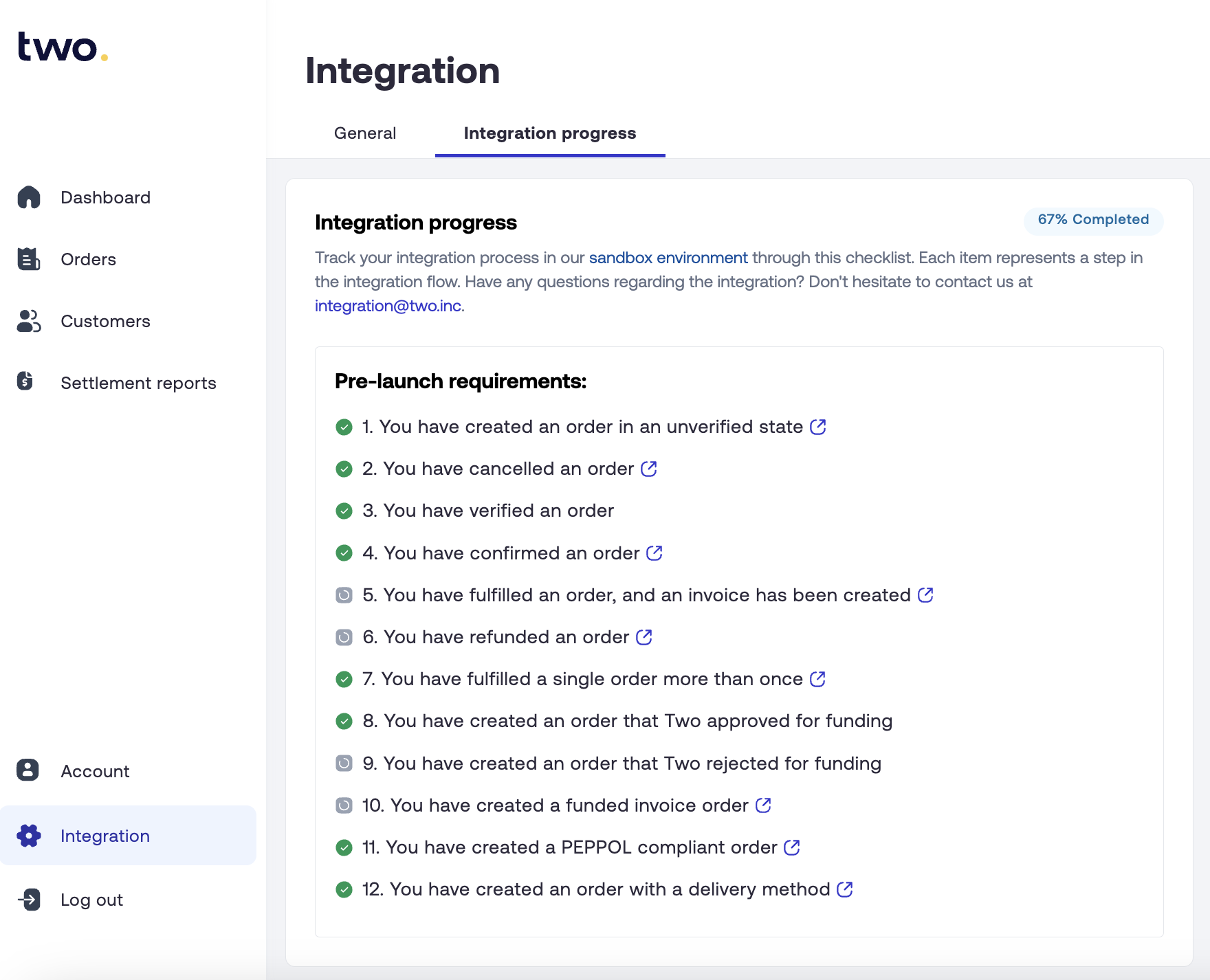
Example: Integration Progress view in the Two Merchant Portal.
- Guidance, Not Exhaustive: This automated tool is a valuable supplementary resource but is not exhaustive and may not cover every specific requirement of your unique integration.
- Supplement to Manual Checks: We strongly recommend using this tool in conjunction with the detailed manual checks outlined in this guide and your own rigorous internal testing procedures.
- Not Strictly Required for All Integrations: Depending on your specific integration needs, not all items in the automated checklist may be applicable or necessary for your go-live.
If you have any questions about your specific integration progress or the automated assessment tool, please reach out to our integration team at [email protected].
General Integration Health Checks
Beyond specific API functionalities, consider these general aspects for a high-quality, resilient integration:
| Area | Checkpoints |
|---|---|
| Error Handling & Logging | Clear user-facing error messages; detailed logging for troubleshooting |
| Regional & Localisation | Test all regions; verify currency and tax handling; localised texts |
| UX Consistency | Consistent experience for new vs returning buyers; seamless design integration |
| System Compatibility | No conflicts with other payment methods or backend systems |
| Performance & Scalability | Monitor API call performance; handle peak load scenarios |
| Security | API keys stored securely; not exposed in client-side code |
| Documentation & Training | Internal documentation; staff training on order management |
Conclusion
Thoroughly assessing your Two integration is a critical investment towards providing a seamless, reliable, and professional B2B purchasing experience. By methodically working through these checkpoints—covering the Order API, Trade Account functionalities, utilising the automated assessment tool wisely, preparing for plugin go-lives, and performing general health checks—you can launch with confidence and build lasting trust with your business customers.
Should you have any questions or require assistance during your assessment, please do not hesitate to contact your Two representative or our dedicated support team at [email protected]. We are here to help you succeed!